De agentes para ferramentas
Na semana passada construímos um agente: system prompt, histórico de conversa e um loop que lembra do que foi dito. Ele tem personalidade e memória — mas continua apenas falando.
Hoje ele ganha mãos. Uma ferramenta (tool) é uma função Python que o modelo pode pedir pra executar. O agente decide quando chamar; o Python decide como executar. É aqui que o ciclo ReAct da semana passada se fecha de verdade: Thought → Action → Observation → Answer.
O problema do LLM puro
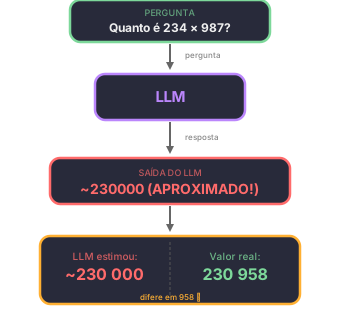
LLMs são modelos de linguagem. Eles preveem texto, não calculam.
Pergunta: "Quanto é 234 × 987?"
O modelo não calcula. Ele prevê a resposta baseado em padrões do treinamento. Pode acertar (se viu esse cálculo antes), mas geralmente erra em números grandes.
A solução: ferramentas (Tools)
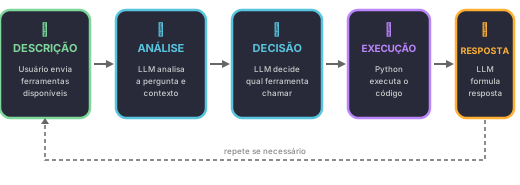
Ferramenta = função Python que o agente pode chamar.
Como funciona o ciclo:
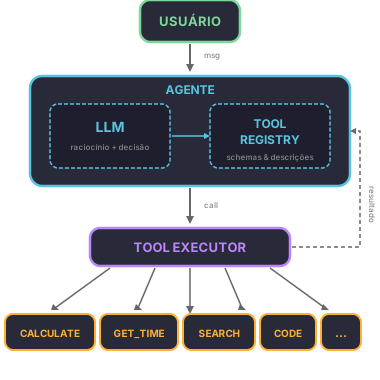
Arquitetura de Ferramentas
Diagrama de Componentes
Referências Importantes
Paper: Toolformer
Título: "Toolformer: Language Models Can Teach Themselves to Use Tools" Autores: Timo Schick, Jane Dwivedi-Yu, Roberto Dessì, et al. Ano: 2023 Link: arXiv:2302.04761
Paper: ReAct
Título: "ReAct: Synergistic Reasoning and Acting in Language Models" Autores: Shunyu Yao, et al. Ano: 2022
O segredo: descrição clara
O modelo decide baseado na descrição.
Descrição RUIM:
Nome: calculate
Descrição: Calculator.
→ Modelo não sabe QUANDO usar.
Descrição BOA:
Nome: calculate
Descrição: Performs a mathematical operation between two numbers and returns the exact result.
           Use when you need to perform numeric calculations.
           Parameters:
             - a: first number (float)
             - b: second number (float)
             - operation: one of 'add', 'subtract', 'multiply', 'divide'
           Output: float with the result
→ Modelo entende quando E como usar.
Implementação: Calculadora Estruturada
Em vez de aceitar uma expressão string e tentar fazer parse (inseguro com eval, complexo com AST), usamos parâmetros nomeados. O LLM escolhe a operação por nome — sem risco de injeção de código.
Código: Funções de Ferramenta
"""
Ferramentas para o agente: calculadora e horário.
Parâmetros nomeados = seguro e simples.
"""

def calculate(a, b, operation):
    """
    Performs a mathematical operation between two numbers.

    Args:
        a: First number
        b: Second number
        operation: One of 'add', 'subtract', 'multiply', 'divide'

    Returns:
        Result of the operation (float)

    Examples:
        >>> calculate(234, 987, 'multiply')
        230958.0
        >>> calculate(10, 3, 'divide')
        3.3333333333333335
    """
    if operation == 'add':
        return a + b
    elif operation == 'subtract':
        return a - b
    elif operation == 'multiply':
        return a * b
    elif operation == 'divide':
        if b == 0:
            return "Erro: divisão por zero"
        return a / b
    else:
        return f"Erro: operação '{operation}' não suportada"


def get_time():
    """
    Returns the current date and time.
    Takes no arguments — this is a query tool.

    Returns:
        String with current date/time (dd/mm/yyyy HH:MM:SS)

    Examples:
        >>> get_time()
        "23/10/2026 15:42:07"
    """
    from datetime import datetime
    return datetime.now().strftime("%d/%m/%Y %H:%M:%S")


# Testes
if __name__ == "__main__":
    print(calculate(234, 987, 'multiply'))  # 230958.0
    print(calculate(10, 5, 'add'))               # 15
    print(calculate(10, 0, 'divide'))            # Erro: divisão por zero
    print(calculate(100, 7, 'divide'))           # 14.285714285714286
    print(get_time())                        # data/hora atual
Por que parâmetros nomeados são melhores?
- eval("expressão")
- Executa código arbitrário. Chamada como
calculate("2**100")pode executar qualquer coisa. - AST parse
- Complexo e quebra fácil. Chamada como
calculate("(5+3)/2")requer um parser inteiro. - Parâmetros nomeados
- Seguro e previsível. Chamada como
calculate(5, 3, 'divide')não tem superfície de ataque.
Com parâmetros nomeados:
- O LLM passa valores explícitos (a, b, operation)
- Não há parsing de expressão — a lógica é direta
- A operação é uma string fixa, não código Python
O decorator @tool do LangChain
O LangChain oferece o decorator @tool que transforma uma função Python em ferramenta automaticamente. O segredo: Pydantic faz o parsing e validação — sem necessidade de código manual.
Como funciona
- Você escreve a função normalmente com type hints e docstring
- O
@toolextrai o schema automaticamente (parâmetros, tipos, descrições) - Quando o LLM chama a ferramenta, Pydantic valida e converte os argumentos
from langchain_core.tools import tool

@tool
def calculate(a: float, b: float, operation: str) -> float:
    """Performs a mathematical operation between two numbers.
    Use when you need to perform numeric calculations.

    Args:
        a: First number
        b: Second number
        operation: One of 'add', 'subtract', 'multiply', 'divide'
    """
    if operation == 'add':
        return a + b
    elif operation == 'subtract':
        return a - b
    elif operation == 'multiply':
        return a * b
    elif operation == 'divide':
        if b == 0:
            return "Erro: divisão por zero"
        return a / b
    else:
        return f"Erro: operação '{operation}' não suportada"


@tool
def get_time() -> str:
    """Returns the current date and time.
    Use when the user asks about the current date, time, or 'what time is it'.
    """
    from datetime import datetime
    return datetime.now().strftime("%d/%m/%Y %H:%M:%S")


@tool
def get_word_length(word: str) -> int:
    """Returns the number of characters in a word.
    Use when the user asks about the length of a word or how many letters it has.
    """
    return len(word)
O que o @tool faz por você
Não precisa de:
- Parsing manual de JSON
- Conversão manual de tipos (string → float)
- Validação manual de argumentos
- Construção manual do schema JSON para o LLM
# ❌ SEM @tool — parsing manual
tool_call = llm_response.tool_calls[0]
args = tool_call["args"]
a = float(args["a"])          # manual!
b = float(args["b"])          # manual!
operation = args["operation"]  # manual!
resultado = calculate(a, b, operation)

# ✅ COM @tool — Pydantic faz tudo
tool_call = llm_response.tool_calls[0]
resultado = calculate.invoke(tool_call["args"])
# Pydantic converte string "234" → float 234.0 automaticamente
Conversão automática de tipos
Pydantic converte tipos automaticamente. Se o LLM envia a"234"= (string), vira a=234.0 (float):
# O LLM pode enviar: {"a": "234", "b": "987", "operation": "multiply"}
# Pydantic converte automaticamente:
#   "234" → 234.0
#   "987" → 987.0
resultado = calculate.invoke({"a": "234", "b": "987", "operation": "multiply"})
# → 230958.0  ✓

# Se o LLM manda algo inválido:
# {"a": "abc", "b": 10, "operation": "add"}
# → ValidationError com contexto claro:
#   "Input should be a valid number, unable to parse string as a number"
Schema JSON gerado automaticamente
O decorator extrai do docstring e type hints:
# Ver o schema gerado
print(calculate.args_schema.schema())

# Resultado:
# {
#   "title": "calculate",
#   "description": "Performs a mathematical operation between two numbers...",
#   "type": "object",
#   "properties": {
#     "a": {"title": "A", "type": "number"},
#     "b": {"title": "B", "type": "number"},
#     "operation": {
#       "title": "Operation",
#       "description": "One of 'add', 'subtract', 'multiply', 'divide'",
#       "type": "string"
#     }
#   },
#   "required": ["a", "b", "operation"]
# }
Obs.: para a ferramenta get_time, o schema é minimal — properties vazio e required vazio, pois não há argumentos.
Conectando ao LLM: Ollama + gemma4:e2b-it-qat
O setup completo do Ollama no Colab está no notebook da Semana 5 — incluindo instalação e ollama pull. Aqui focamos em como conectar as ferramentas ao LLM.
Conexão via ChatOpenAI
O modelo gemma4:e2b-it-qat expõe endpoint OpenAI-compatible (/v1/chat/completions), então usamos ChatOpenAI do langchain-openai:
from langchain_openai import ChatOpenAI

llm = ChatOpenAI(
    model="gemma4:e2b-it-qat",
    base_url="http://localhost:11434/v1",
    api_key="ollama",  # Ollama não precisa de key real
    temperature=0,
)
O ciclo manual: bindtools
A forma mais básica de usar ferramentas no LangChain é com bind_tools. O LLM decide qual ferramenta chamar, mas não executa — isso fica por sua conta.
from pprint import pprint
from langchain_openai import ChatOpenAI
from langchain_core.tools import tool

@tool
def calculate(a: float, b: float, operation: str) -> float:
    """Performs a mathematical operation between two numbers.
    Use when you need to perform numeric calculations.

    Args:
        a: First number
        b: Second number
        operation: One of 'add', 'subtract', 'multiply', 'divide'
    """
    if operation == 'add': return a + b
    elif operation == 'subtract': return a - b
    elif operation == 'multiply': return a * b
    elif operation == 'divide':
        if b == 0: return "Erro: divisão por zero"
        return a / b
    else: return f"Erro: operação '{operation}' não suportada"

@tool
def get_time() -> str:
    """Returns the current date and time.
    Use when the user asks about the current date, time, or 'what time is it'.
    """
    from datetime import datetime
    return datetime.now().strftime("%d/%m/%Y %H:%M:%S")

@tool
def get_word_length(word: str) -> int:
    """Returns the number of characters in a word.
    Use when the user asks about the length of a word or how many letters it has.
    """
    return len(word)

llm = ChatOpenAI(
    model="gemma4:e2b-it-qat",
    base_url="http://localhost:11434/v1",
    api_key="ollama",
    temperature=0,
)

# Bind: registra as ferramentas no LLM
llm_com_ferramentas = llm.bind_tools([calculate, get_time, get_word_length])

# Um registro por nome: o LLM devolve o nome, a gente acha a função
FERRAMENTAS = {
    calculate.name: calculate,
    get_time.name: get_time,
    get_word_length.name: get_word_length,
}
Passo 1: O LLM decide, mas não executa
resposta = llm_com_ferramentas.invoke("Quanto é 234 vezes 987?")
pprint(resposta.tool_calls)
# [{'args': {'a': 234, 'b': 987, 'operation': 'multiply'},
#   'id': 'call_abc123',
#   'name': 'calculate',
#   'type': 'tool_call'}]
Repare: resposta.content é string vazia. O LLM não calculou — só disse "use calculate com estes argumentos". A execução é tua.
Passo 2: Você executa a ferramenta
# Extrair a primeira tool_call
tc = resposta.tool_calls[0]

# O LLM devolve o NOME da ferramenta; o registro acha a função
resultado = FERRAMENTAS[tc['name']].invoke(tc['args'])

print(resultado)  # 230958.0
Esse registro por nome é o que escala: amanhã você adiciona uma ferramenta nova ao dicionário e não precisa mexer no código do ciclo.
Passo 3: Resultado volta pro LLM
Agora você manda o resultado de volta pro LLM com ToolMessage, e ele formula a resposta final:
from langchain_core.messages import HumanMessage, ToolMessage

mensagens = [
    HumanMessage(content="Quanto é 234 vezes 987?"),
    resposta,  # AIMessage com tool_call
    ToolMessage(content=str(resultado), tool_call_id=tc['id']),
]

resposta_final = llm_com_ferramentas.invoke(mensagens)
print(resposta_final.content)
# "O resultado de 234 vezes 987 é 230.958."
Resumo do ciclo manual
- invoke → LLM decide (retorna
tool_calls, não executa) - você executa a ferramenta com os argumentos
- invoke de novo com
ToolMessage→ LLM formula a resposta final
É ReAct em ação: Thought (LLM raciocina) → Action (chama ferramenta) → Observation (vê o resultado) → Answer (responde) (Yao et al., 2022).
E quando a resposta precisa de duas ferramentas?
"Quanto é 10 mais 100 vezes 3?" não é uma conta só: é 10 + (100 * 3). O modelo pede a multiplicação, recebe o resultado, e então pede a soma — dois passos.
Se você faz um ciclo só, a resposta final volta vazia: ele ainda está pedindo ferramenta. O ciclo tem que repetir até não sobrar nenhuma tool_calls:
from langchain_core.messages import HumanMessage, SystemMessage, ToolMessage

historico = [
    SystemMessage(content="Você é um assistente que responde em português."),
    HumanMessage(content="Quanto é 10 mais 100 vezes 3?"),
]

resposta = llm_com_ferramentas.invoke(historico)

for _ in range(5):
    historico.append(resposta)

    if not resposta.tool_calls:
        print(resposta.content)
        break

    for tc in resposta.tool_calls:
        resultado = FERRAMENTAS[tc['name']].invoke(tc['args'])
        historico.append(ToolMessage(content=str(resultado), tool_call_id=tc['id']))

    resposta = llm_com_ferramentas.invoke(historico)
O for _ in range(5) é um freio: um agente com raciocínio ruim pode entrar em loop pedindo ferramenta pra sempre. Um limite de passos evita que a aula trave.
Repare também que o histórico vai acumulando tudo: mensagem do usuário, o pedido de ferramenta do modelo, o resultado, e a resposta final. É o mesmo mecanismo de memória da semana passada — só que agora os passos intermediários do ReAct também ficam guardados.
O ciclo automático: createagent
O ciclo manual é importante pra entender o que acontece por baixo. Mas na prática, você não quer gerenciar ToolMessage e múltiplas chamadas na mão. O LangChain resolve isso com create_agent:
from langchain.agents import create_agent

ferramentas = [calculate, get_time, get_word_length]
agente = create_agent(llm, ferramentas)

# Uma linha — o agente faz o ciclo inteiro
resultado = agente.invoke({"messages": "Quanto é 234 vezes 987?"})
print(resultado["messages"][-1].content)
# "O resultado de 234 vezes 987 é 230.958."
O create_agent faz automaticamente:
- Decide se precisa de ferramenta
- Executa a ferramenta
- Manda o resultado de volta pro LLM
- Repete se necessário (várias ferramentas em sequência)
- Retorna a resposta final
Manual vs Automático
- Manual (
bind_tools) - Você controla cada passo. Bom pra aprender e debugar.
- Automático (
create_agent) - Uma linha. Bom pra produzir.
Um gostinho de async
Todas as chamadas que fizemos usam invoke() — síncrono, o código espera a resposta. Mas em Python existe outro jeito:
import asyncio

async def conversar():
    future = agente.ainvoke({"messages": "Quanto é 234 vezes 987?"})
    print("Processando...")  # roda imediatamente
    resultado = await future  # agora espera
    print(resultado["messages"][-1].content)

asyncio.run(conversar())
Em notebooks Jupyter/Google Colab, o loop de eventos já está rodando, então asyncio.run() falha. Use nest_asyncio como workaround:
import nest_asyncio
nest_asyncio.apply()

# Agora asyncio.run() funciona no Jupyter/Colab
A diferença: ainvoke (com a de async) deixa o programa fazer outras coisas enquanto espera o LLM responder. Não parece muito com um agente só — mas quando você tem vários agentes ou várias ferramentas rodando ao mesmo tempo, faz toda a diferença.
Vamos usar isso na próxima aula.
Exercício 1: Ferramenta de Contagem de Palavras
Implemente uma ferramenta que conta palavras, caracteres e frases de um texto usando o decorator @tool.
📝 Gabarito
from langchain_core.tools import tool

@tool
def count_text(text: str) -> dict:
    """Analyzes a text and returns statistics.
    Use when the user wants to know the size of a text.

    Args:
        text: Text to be analyzed
    """
    if not text:
        return {"words": 0, "characters": 0, "sentences": 0}

    words = len(text.split())
    characters = len(text)
    sentences = len([s for s in text.split('.') if s.strip()])

    return {
        "words": words,
        "characters": characters,
        "sentences": sentences
    }

# Teste
print(count_text.invoke({"text": "Olá mundo. Como vai?"}))
# {"words": 4, "characters": 18, "sentences": 2}
Exercício 2: Testar Conversão Automática
Crie um agente com calculate e get_word_length. Envie mensagens que testem:
- Cálculo simples: "Quanto é 100 + 200?"
- Divisão: "Divida 1000 por 7"
- Comprimento de palavra: "Quantas letras tem a palavra 'Python'?"
- Erro: "Calcule 5 dividido por 0"
📝 Gabarito
from langchain_openai import ChatOpenAI
from langchain_core.tools import tool

@tool
def calculate(a: float, b: float, operation: str) -> float:
    """Performs a mathematical operation between two numbers.
    Use when you need to perform numeric calculations.
    Args:
        a: First number
        b: Second number
        operation: One of 'add', 'subtract', 'multiply', 'divide'
    """
    if operation == 'add': return a + b
    elif operation == 'subtract': return a - b
    elif operation == 'multiply': return a * b
    elif operation == 'divide':
        if b == 0: return "Erro: divisão por zero"
        return a / b
    else: return f"Erro: operação '{operation}' não suportada"

@tool
def get_word_length(word: str) -> int:
    """Returns the number of characters in a word.
    Use when the user asks about the length of a word or how many letters it has.
    """
    return len(word)

llm = ChatOpenAI(
    model="gemma4:e2b-it-qat",
    base_url="http://localhost:11434/v1",
    api_key="ollama",
    temperature=0,
)

llm_com_ferramentas = llm.bind_tools([calculate, get_word_length])

perguntas = [
    "Quanto é 100 + 200?",
    "Divida 1000 por 7",
    "Quantas letras tem a palavra 'Python'?",
    "Calcule 5 dividido por 0",
]

for pergunta in perguntas:
    print(f"\n--- {pergunta} ---")
    resposta = llm_com_ferramentas.invoke(pergunta)
    if resposta.tool_calls:
        for tc in resposta.tool_calls:
            if tc['name'] == 'calculate':
                resultado = calculate.invoke(tc['args'])
            elif tc['name'] == 'get_word_length':
                resultado = get_word_length.invoke(tc['args'])
            print(f"  {tc['name']}({tc['args']}) -> {resultado}")
    else:
        print(f"  {resposta.content}")
Exercício 3: Nova Ferramenta
Crie uma ferramenta convert_temperature(value: float, from_unit: str, to_unit: str) com @tool, onde from_unit e to_unit são 'celsius', 'fahrenheit', 'kelvin'. Adicione ao agente e teste.
📝 Gabarito
from langchain_core.tools import tool

@tool
def convert_temperature(value: float, from_unit: str, to_unit: str) -> float:
    """Converts temperature between Celsius, Fahrenheit and Kelvin.
    Args:
        value: Temperature to convert
        from_unit: Source scale ('celsius', 'fahrenheit', 'kelvin')
        to_unit: Target scale ('celsius', 'fahrenheit', 'kelvin')
    """
    # Converter para Celsius primeiro
    if from_unit == 'celsius':
        c = value
    elif from_unit == 'fahrenheit':
        c = (value - 32) * 5 / 9
    elif from_unit == 'kelvin':
        c = value - 273.15
    else:
        return f"Erro: escala '{from_unit}' não suportada"

    # Converter de Celsius para destino
    if to_unit == 'celsius':
        return c
    elif to_unit == 'fahrenheit':
        return c * 9 / 5 + 32
    elif to_unit == 'kelvin':
        return c + 273.15
    else:
        return f"Erro: escala '{to_unit}' não suportada"

# Teste
print(convert_temperature.invoke({"value": 100, "from_unit": "celsius", "to_unit": "fahrenheit"}))
# 212.0
Próxima Aula
Semana 08 (30/10): Ferramentas Múltiplas — hoje o agente aprendeu a chamar uma ferramenta. Na próxima ele ganha várias, e precisa escolher qual usar (e encadear mais de uma na mesma pergunta). É onde o tool calling começa a ficar interessante de verdade.